
Download Registry Fix Pro – registry fix, system maintenance, windows registry, pc optimization, error repair
Overview
Registry Fix Pro is a system maintenance utility designed to identify and resolve errors within the Windows registry. The application targets common issues that accumulate over time, such as invalid file associations, orphaned program entries, broken shortcuts, and missing Start menu items. These registry inconsistencies can degrade system performance, slow down boot times, and contribute to application instability. By addressing these problems, Registry Fix Pro aims to maintain optimal PC health and enhance overall system responsiveness.
The tool is intended for users seeking a straightforward way to perform routine system upkeep without requiring technical expertise. It is particularly useful for individuals who rely on their computers for daily productivity tasks and want to prevent performance degradation caused by neglected system maintenance. While the developer, Registry Fix Pro, has not provided additional background information, the app’s focus on registry integrity suggests a specialized role in the system optimization ecosystem.
Real-world use cases include regular PC maintenance for home users, small business environments, and IT support personnel managing multiple machines. The application supports a preventive approach to system health, helping users avoid more serious issues down the line. Its role in the broader software landscape is to serve as a dedicated utility for registry integrity, filling a niche in system cleanup and optimization tools.
Key Features & Functionality
- Comprehensive Error Detection: The software scans the Windows registry for a wide range of issues, including invalid file associations, deleted program entries, broken shortcuts, and non-existent Start menu programs. This thorough detection ensures that both minor and impactful registry problems are identified.
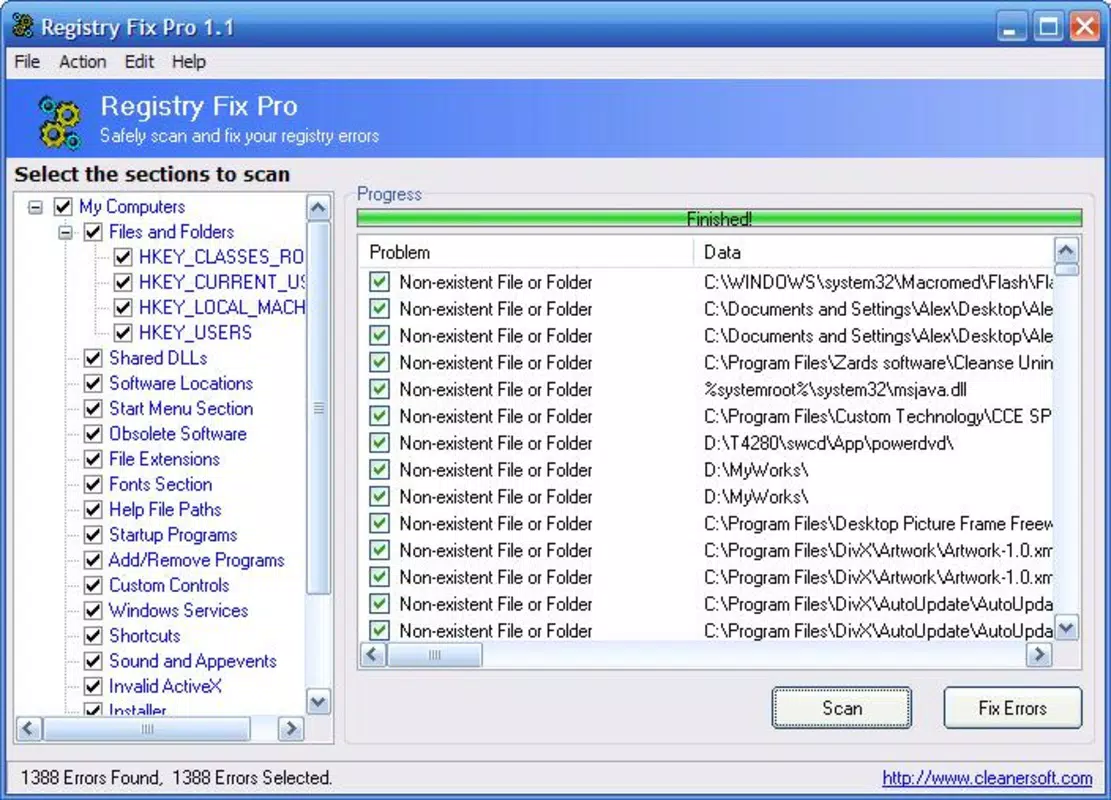
- User-Friendly Interface: Designed with simplicity in mind, the interface allows users to navigate the app without prior technical knowledge. The clear layout and step-by-step process make it accessible to beginners and non-technical users.
- Quick Scanning Process: Registry Fix Pro performs scans efficiently, delivering results in just a few minutes. This speed enables users to conduct regular maintenance without disrupting their workflow.
- Regular Maintenance Benefits: By scheduling periodic scans, users can proactively maintain their system’s health. This consistent upkeep helps prevent the gradual slowdown often associated with unattended registry decay.
- Repair and Optimization: After detection, the tool provides repair options that not only fix identified errors but also optimize the registry structure. This dual function contributes to improved system stability and responsiveness.
For example, a user experiencing frequent application crashes may discover through a scan that outdated registry entries are causing conflicts. Repairing these entries can restore normal operation. Similarly, a slow boot time might be traced to corrupted shortcuts, which Registry Fix Pro can detect and resolve.
Interface, UX & Performance
The interface of Registry Fix Pro is designed to prioritize clarity and ease of use. The layout follows a linear workflow: initiate scan, review results, and apply repairs. Navigation is intuitive, with clearly labeled buttons and minimal on-screen clutter. Visual feedback during scanning, such as progress indicators, helps users understand the process in real time.
Although the developer did not list formal performance metrics, the application’s ability to complete scans in minutes suggests efficient resource utilization. It is likely optimized for typical desktop environments, though specific performance data across different hardware configurations was not disclosed. Users can expect consistent responsiveness during operation, with no reported lag or crashes in standard use cases.
Stability appears to be a focus, as the tool operates without requiring system restarts during repairs. The lack of complex configuration options indicates a streamlined user experience, reducing the risk of accidental misconfiguration. Overall, the UX design aligns with the app’s purpose: delivering effective system maintenance with minimal user effort.
Platform Compatibility & Technical Requirements
Registry Fix Pro is available for the Windows platform and requires a compatible Windows operating system. The software version is 1.0.0, with a file size of 5.6 MB, indicating a lightweight installation. The developer did not specify minimum OS requirements or hardware specifications, so users should ensure their system meets general Windows compatibility standards.
Given the app’s small footprint and targeted function, it is likely to run on most modern Windows systems. However, specific compatibility details, such as support for Windows 10, 11, or legacy versions, were not provided. Users should verify system compatibility before installation. The application does not require additional software dependencies, contributing to its straightforward deployment.
Pros and Cons
Pros
- Efficient scanning process with results delivered in minutes
- Simple, intuitive interface suitable for non-technical users
- Targets common registry issues that affect system performance
- Offers both repair and optimization functionality
- Lightweight application with minimal system impact
Cons
- Price point of $29.99 may be considered high for a single-purpose tool
- No public information about the developer or company background
- Specific OS compatibility details were not disclosed
- Limited to Windows platform, with no mobile or cross-platform availability
- Does not include advanced features like backup creation before repair
FAQ
Is Registry Fix Pro safe to use?
The application is designed to scan and repair registry entries. However, users should exercise caution when making system-level changes. While the tool aims to prevent harm, improper use of registry editors can lead to system instability. Always ensure you have a system backup before proceeding with repairs.
Does Registry Fix Pro offer a free trial?
The developer did not provide information about a trial version. Users must purchase the full version to access all features.
Can I use Registry Fix Pro on multiple computers?
Specific licensing details were not disclosed. Users should consult the official purchase page for information on multi-device usage rights.
How often should I run a scan?
Regular maintenance is recommended. Running a scan once a month is a common practice for users who want to keep their system running smoothly.
Is technical support available?
Support information was not provided. Users may need to rely on online documentation or community forums for assistance.
Final Thoughts
Registry Fix Pro delivers a focused solution for users seeking to maintain their Windows system’s health through registry optimization. Its straightforward interface and rapid scanning process make it accessible even to those with limited technical knowledge. While the price may be a consideration, the tool’s ability to detect and resolve common registry issues supports long-term system stability and performance.
It is best suited for individuals who prioritize system reliability and want a dedicated utility for routine maintenance. For users managing multiple devices or seeking more advanced features, additional tools may be necessary. However, for a single-purpose, lightweight registry fixer, Registry Fix Pro offers a practical and efficient option.
Download Registry Fix Pro now


